1DM+: Browser & Video Download
Vicky BonickTools
4.71.46K Reviews
- Version
- 18.2
- Installs
- 100.00K
- Age Rating
- Everyone
Screenshots
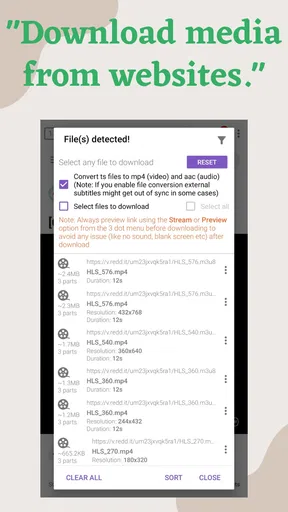
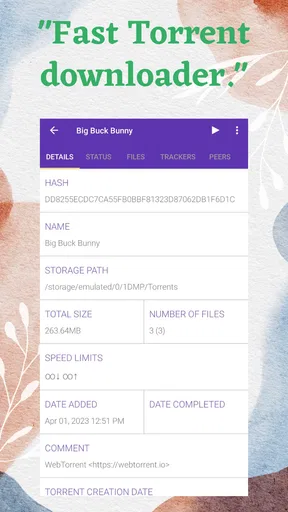
Our Review of 1DM+: Browser & Video Download
 Analysis by Appyee
I often notice the same small frustration when browsing on a phone: finding something useful is easy, but saving it for later can turn into a hunt through menus, share sheets, and separate apps. A browser, a download manager, and an ad blocker each solve part of that problem, yet switching among them adds friction. 1DM+: Browser & Video Download brings those jobs together, and I judge it mainly by whether that saves time without making everyday browsing feel like work.
When one app can replace several small steps
As a tools app from developer Vicky Bonick, 1DM+ is built around browsing and handling downloads rather than being a general-purpose media library. That distinction matters: it is most useful when I want to locate a file in a browser and manage the download from the same place. If I only stream videos and rarely save files, a standard browser is probably simpler.
The practical benefit is not just having more download controls. It is having a clearer route from “I found this” to “I can use it later.” That is especially helpful with larger files or an unreliable connection, where losing progress means repeating work. I would not treat any downloader as a way around a site’s rules, though; I only save material I have permission to keep, and availability can depend on the site itself.
Seamless Browsing Experience
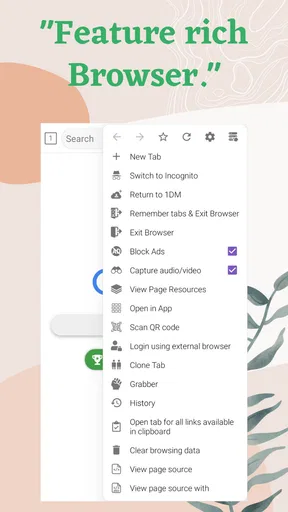
First things first, the browsing. 1DM+ is designed to be light and efficient, which means it doesn’t hog your phone’s resources. Navigating through different websites feels smooth, and the pages load pretty quickly. I didn’t experience any annoying lags or crashes, which is a huge plus in my book. It’s like having a mini-computer in your pocket.
A sensible first setup for saving time
My advice is to begin with the parts you will actually use instead of adjusting every setting at once. Pick a comfortable browsing appearance, check the download behavior, and try saving one small file from a familiar page. That quick test helps you learn where downloads appear and how to return to them, before a time-sensitive file or a spotty connection makes the process stressful.
It also helps to think about what belongs on your phone. A download manager can make it tempting to save everything “just in case,” but that creates clutter and makes useful files harder to find. I get more value by treating downloads as a short workflow: save what I need, check that it arrived, then move on or remove it when it is no longer useful. The app’s controls matter most when they reduce repeated searching, not when they encourage a growing pile of files.
Downloading Made Easy
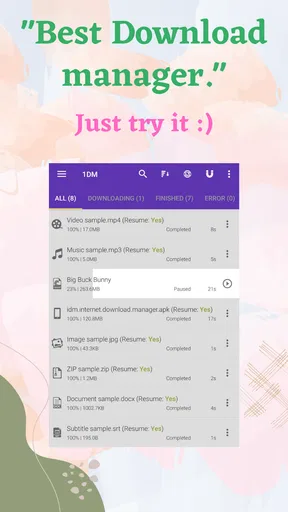
Now, onto the downloading feature, which is where 1DM+ truly shines. This app supports a wide range of file formats, which means I can download videos, music, and even documents without any hassle. The download speed is impressive, thanks to its smart download manager that can boost speeds up to 500%! Yes, you read that right. It splits the download into multiple parts and grabs them simultaneously. This multitasking capability is like having a bunch of worker bees hustling for you.
One thing that caught my eye is the option to resume downloads. How many times have you started a download only for it to get interrupted by a poor connection? With 1DM+, those frustrations are a thing of the past. The ability to pause and resume downloads at will is a lifesaver!
Where the download controls pay off
Resuming is most valuable when a file takes long enough that restarting would be irritating: think of a document needed for a trip, a permitted video for offline viewing, or a large file being fetched over an uneven connection. I would still check the finished file rather than assuming every interrupted transfer will resume perfectly. Network changes and the source server can affect what is possible, so the sensible habit is to confirm completion before relying on a download.
One useful trade-off is the multi-part approach described by the app. It can help make better use of a connection, but it cannot create bandwidth that is not there, and some servers may limit or reject segmented requests. If a download is already moving steadily, I would leave it alone; if it is crawling, the manager gives me another approach to try, not a promise that every source will become fast.
For everyday organization, I would avoid starting several big downloads at once on a phone that is also being used for calls, navigation, or other tasks. A queue is only helpful if I can still tell what I need first. Prioritizing one urgent file, then leaving less important items for later, is a simple way to make the app feel like a tool rather than another source of notifications and housekeeping.
User-Friendly Interface
The interface is user-friendly and intuitive. Whether you’re a tech guru or a newbie, navigating through the app is a breeze. Everything is laid out clearly, making it easy to find what you need. The settings are customizable, allowing you to tailor your browsing and downloading experience to your liking.
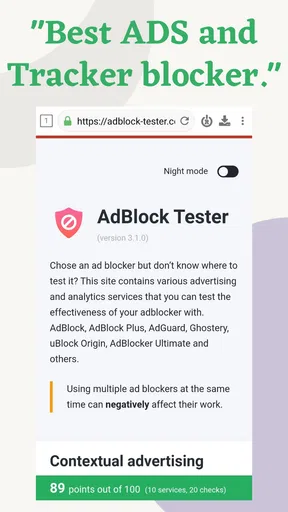
I particularly enjoy the built-in ad blocker. It’s like having a personal bodyguard that keeps annoying ads at bay, making my browsing experience much cleaner and more enjoyable. Plus, there’s a dark mode option, which is perfect for late-night browsing without straining your eyes.
A realistic day with the browser
Imagine I am checking a travel page during a commute and find a timetable or other document I want to keep available later. I can browse, save it, and then verify the file before I lose the connection. If I later find a video that is legitimately available to download, the same general workflow keeps me from opening a separate browser just to start the transfer. The value is modest but real: fewer handoffs, and less chance of forgetting where I began.
That convenience is different from offline streaming inside a dedicated video service. A service app may be the better choice when it offers its own official offline mode, because it can manage playback and access within that service. 1DM+ makes more sense when I need a general browser and download manager for compatible content, not when I want a curated streaming catalog or automatic media recommendations.
Cleaner pages, with a few trade-offs
The ad blocker can make browsing less cluttered, but it is not a guarantee that every page will behave exactly as its publisher intended. Some sites rely on advertising or scripts for parts of their layout, so if a page looks broken, I would try changing the relevant blocking behavior or opening the site another way. This is a useful tool for reducing interruptions, not a reason to expect every page to load perfectly.
Dark mode is similarly a comfort option rather than a substitute for good screen habits. It suits a dim room, but page colors and contrast can vary from site to site. I would judge it by whether text stays readable on the pages I visit, rather than assuming a darker interface automatically improves every browsing session.
Who will get the most from it
I would recommend it to people who regularly save files from the web, want download controls beyond the basic browser button, or prefer one place for browsing and transfers. It is also appealing if interrupted downloads are a recurring annoyance. The app has a 4.7 average from around 37,000 ratings, and it has passed 100,000 installs, so it has found an audience among people looking for this kind of utility.
By contrast, someone who mainly uses a phone for messaging, social feeds, and streaming may not need a dedicated downloader. A default browser is usually enough for occasional small files, while a site’s own app can be a better fit for content it manages. I would also skip 1DM+ if I expect every protected or restricted video to be downloadable; a browser tool cannot override a site’s access controls or permissions.
Security and Privacy
In today’s digital age, security is paramount. 1DM+ takes this seriously by offering several privacy features. You can browse privately with incognito mode, ensuring your history and cookies aren’t saved. It’s like wearing an invisibility cloak when surfing the web.
Furthermore, the app doesn’t track your activity or collect personal data, which is a huge relief. Knowing that my privacy is respected makes me feel secure, and it’s a feature that everyone can appreciate.
Private browsing is best understood as a way to keep a session from being retained in the browser history and cookies; it should not be confused with complete anonymity. I still use sound judgement about the pages I visit and the files I save. That distinction is worth keeping in mind whenever an app offers an incognito mode, because privacy tools have specific jobs rather than making every part of internet use invisible.
Cost, version, and everyday expectations
Because this is a paid app at $3.99, I would decide based on how often I actually download files. If I use the browser and its download controls every week, paying for a tool that removes repeated steps may feel worthwhile. If I only save a file once in a while, a free browser’s basic download option may be enough. Its Everyone age rating makes it suitable for a broad audience, but it does not change the need to use care with downloaded content.
The current version is 18.2, and the app was released on March 8, 2017. Those details put it in the category of an established utility rather than a brand-new experiment, but I would still keep it updated through the relevant app store and judge its behavior on my own device. A long-running app can be familiar and capable while still having a learning curve if its settings are more extensive than a casual user needs.
Conclusion: A Reliable Companion
Overall, 1DM+: Browser & Video Download is a solid choice for anyone looking to enhance their mobile browsing and downloading experience. It’s packed with features that cater to both casual users and tech enthusiasts. The combination of speed, efficiency, and privacy makes it a standout app in its category.
If you’re interested in trying it out, you can easily find it on both Android and iOS. It’s time to say goodbye to slow downloads and hello to a smoother, more efficient way of browsing and downloading. Trust me, you won’t regret giving 1DM+ a shot!
My final call on the trade-off
For me, the decision comes down to repetition. If I often move from a webpage to a file I want to keep, the combined browser and downloader can remove enough little interruptions to justify having a dedicated utility. If downloads are rare, or if most of my offline viewing happens inside a subscription service, I would stick with the simpler option already built into that service or my usual browser.
The app’s strongest case is practical rather than flashy: browse, start a compatible download, and manage it without jumping between several tools. Its limits are equally practical. A better manager cannot fix a weak connection or a source that blocks downloads, and its extra controls are unnecessary for people who never save much. With those expectations in place, I see it as a useful specialist for frequent downloaders, not an essential install for every phone.
Verdict
Strengths of 1DM+: Browser & Video Download
- Fast download speeds for large files.
- Supports multiple file formats.
- Built-in browser for seamless navigation.
- Pause and resume downloads easily.
- User-friendly interface with customization.
Limitations of 1DM+: Browser & Video Download
- Contains in-app ads that can be intrusive.
- Occasional crashes with large files.
- Limited support for certain websites.
- Premium features require a purchase.
- Interface can feel cluttered at times.
Similar Picks in This Category
View All
Google LLC4.0

Gboard - the Google Keyboard
Google LLC4.5

Google Play services
Google LLC4.3

Google Play Store
Google LLC4.9

Files by Google
Google LLC4.5

SHAREit: Transfer, Share Files
Smart Media4U Technology Pte.Ltd.4.3
Frequently Asked Questions
What are the main features of 1DM+?
1DM+ (formerly IDM+) is a powerful download manager for Android that supports up to 16 parts per download, which can significantly increase speed. It also allows for video and audio downloads from various websites, provides a built-in browser with ad-blocking capabilities, and supports torrent downloads. The app is designed to be lightweight and efficient, offering a seamless downloading experience.
Is 1DM+ safe to use on my device?
Yes, 1DM+ is safe to use on Android devices. It does not contain any malware or spyware, and it respects user privacy by not collecting unnecessary personal data. Additionally, it comes with built-in security features that protect users from malicious sites and downloads. Always ensure you download the app from a reliable source like the Google Play Store.
Can I download videos from any site using 1DM+?
1DM+ supports video downloads from a wide range of websites, but not all. Some sites, particularly those with strict copyright protections or streaming restrictions, may not be compatible. The app's built-in browser can help identify downloadable media, but users should always respect copyright laws and the terms of use of the respective websites.
Does 1DM+ support torrent downloads?
Yes, 1DM+ supports torrent downloads, allowing users to download files via magnet and .torrent links directly. This feature makes it versatile for users who frequently download from peer-to-peer networks. However, users should be mindful of legal considerations when downloading torrents and ensure they have permission to access copyrighted content.
How does 1DM+ handle large file downloads?
1DM+ is designed to efficiently handle large file downloads by splitting them into multiple parts, up to a maximum of 16, to accelerate download speeds. The app also supports resuming interrupted downloads, which is particularly beneficial for large files. This ensures a smooth downloading process without the need to start over in case of connection issues.
